

GEPCO New AMR smart energy Net Meter – Complete Guide 2025
Recently, GEPCO started installing new net metering devices called AMR smart energy Net Meter. Unfortunately, very little information is available about these new meters, and even GEPCO staff have limited knowledge about them. In this article, you will find complete information about these new AMR Smart Energy Meters for Solar Net Metering.
AMR stands for ‘Automatic Meter Reading.’ These new smart solar energy meters are replacing the old green bidirectional meters both in the GEPCO region and nationwide. This initiative aims to reduce the influence and involvement of meter reading staff, as the meters provide automatic data collection directly to the GEPCO control room.
New AMR Smart Energy Meter Types
These SIM-based automation-supported meters are the latest technology and promote the idea of meter-reader-free readings in the GEPCO region. Currently, there are mainly two types of Smart AMR Energy Meters in use in GEPCO. The two types are as follows;
- Smart Energy AMR Solar Net Meter Bi-Directional
- Smart Energy AMR Solar Net Meter Uni-Directional (Programmable to Bi-Directional)
1. Smart Energy AMR Solar Net Meter Bi-Directional
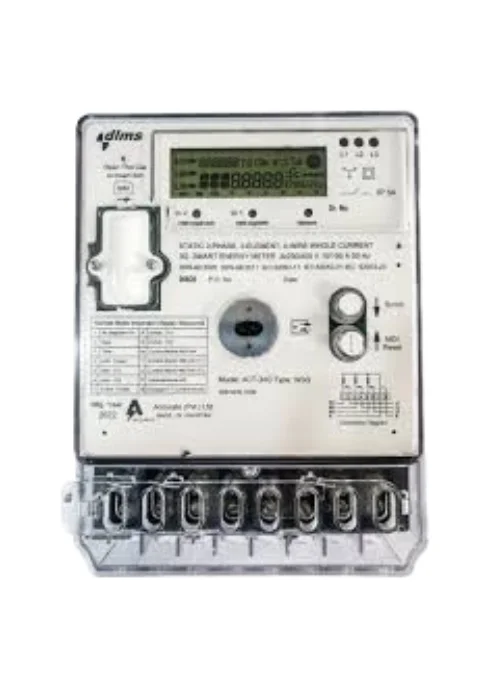

The Smart Energy AMR Solar Net Meter Bi-Directional is a simple and easy-to-understand device for both consumers and staff. It is similar to the old green bidirectional meter, with the only difference being the addition of a ‘SIM’ for automatic meter reading.
3. Smart Energy AMR Solar Net Meter Uni-Directional (Programmable to Bi-Directional)

This is a new meter device that has nothing in common with the old meters. It looks complicated and tricky for both consumers and GEPCO staff. But no worries—reading this article will help you understand it and make things easier.
The most complicated aspect of this meter is reading the import/export units. This is because it is essentially a simple unidirectional 3-phase whole current static energy meter with the software option to be programmed as a bidirectional energy meter.
Please read the complete article to understand how to read the import/export readings in this smart energy meter.
How to Check Sim Activation Status or Modem Status in smart energy meter
It is important to know the activation status of the “SIM” used in the smart energy meter. This is a simple and visual check method that anyone can perform in a matter of seconds.
To check the status, go to the AMR meter and read the LCD screen. In the upper-right corner of the meter screen, there is an antenna symbol with signal bars. The number of bars indicates the network strength.
Another way is to observe the small light on the AMR meter labeled “Modem Status.” If this light is blinking rapidly, it shows weak signal strength. If the light is stable, it means there is strong signal strength and a 3G or 4G network is available to the meter.
GEPCO AMR Solar Net Metering Meter: Import/Export Units & Monthly Bill Guide
If you have the “Smart Energy AMR Solar Net Meter Bi-Directional” installed at your end, you are lucky. This is a very simple meter designed for use as a bidirectional smart energy meter. The reading method of this meter has already been in use for years, the same as in the old green meters.
Just go and check the readings for import units:
- Reading No. 6 shows the number of import units during peak hours.
- Reading No. 8 shows the number of import units during off-peak hours.
For checking the reading for export units just go and check the readings:
- Reading No. 7 shows the number of export units during peak hours.
- Reading No. 9 shows the number of export units during off-peak hours.
If you have the “Smart Energy AMR Solar Net Meter Uni-Directional (Programmable to Bi-Directional)” installed at your end, it is unfortunate for you.
Please do not panic if you are unable to get the import/export reading. The difficult time will end soon.
Mostly, this is the meter in use in this category: “Static 3-Phase Whole Current Smart Energy Meter (Uni-Directional Programmable to Bi-Directional R326_DTGC3).”
This meter does not show the import/export reading directly like the bidirectional smart meter or the old green meter. However, after the programming is executed at the GEPCO end (approximately 15 days from the MCO date), you will be able to read the import/export data.
The MCO date is different from the meter installation date. It usually takes between 40 to 45 days after installation. Despite not being able to check the import/export reading initially, it is being counted from the time of installation. This means your units—whether import or export—are included in the meter reading from the day of installation.
Please be aware that these readings appear in KVR before the programming is executed at the GEPCO end. However, once the programming is completed by GEPCO, the readings become simple and are displayed as normal readings, just like the other:
- Reading No. 6 shows the number of import units during peak hours.
- Reading No. 8 shows the number of import units during off-peak hours.
For checking the reading for export units just go and check the readings:
- Reading No. 7 shows the number of export units during peak hours.
- Reading No. 9 shows the number of export units during off-peak hours.
How to Check Error in AMR Smart Energy Net Meter
Go to the end of the readings in the meter (usually after reading number 30). There is a reading named Error Reading E1.
- If this Error Reading E1 shows 00000000000, it means everything is fine and there is no error in the meter. The SIM and all functions of the meter are working properly.
- If this Error Reading E1 shows 0000010000 or something similar (with a 1 among the zeros), it means there is an issue. It could be that the SIM is not working or there is another problem with the meter.
In this case, please contact your concerned GEPCO sub-division or initiate a complaint. For more details on how to register a complaint, please visit here.
For more information and to check your latest GEPCO electricity bill online, visit our GEPCO Bill Check page. You can also explore helpful guides such as GEPCO Online Bill Calculator and GEPCO Net Metering Guide. Blog page for latest post about gepco.
FAQs for AMR Net Metering (GEPCO 2025)
What is the new AMR meter introduced by GEPCO?
The AMR (Automatic Meter Reading) meter is a smart solar energy meter with a SIM card that sends readings directly to GEPCO, reducing the need for manual meter reading.
What are the types of AMR smart energy meters in GEPCO?
There are two types of AMR smart meters:
1. Bi-Directional Smart AMR Solar Net Meter
2. Uni-Directional Smart AMR Solar Net Meter (Programmable to Bi-Directional)
How can I check the SIM or modem status of my AMR meter?
Look for the antenna signal bars on the meter’s LCD screen. Stable modem light means strong signals, while a fast-blinking light shows weak signal strength.
How do I read import and export units on a GEPCO AMR meter?
For Bi-Directional meters:
Reading 6 = Import (Peak)
Reading 8 = Import (Off-Peak)
Reading 7 = Export (Peak)
Reading 9 = Export (Off-Peak)
For Uni-Directional meters, readings appear after GEPCO programming (around 40–45 days).
How can I check errors in my AMR smart energy meter?
Go to Error Reading E1 (after reading 30). If it shows 00000000000, your meter is fine. If it shows 0000010000 (or similar), there’s a problem with the SIM or meter, and you should contact GEPCO.


